goframe 框架教程
goframe 介绍
goframe 是一个大而全的 Go 框架。
官方文档内容非常详细&齐全,👉 https://goframe.org/
通常不会存在 100% 符合你需求的框架。
gf
gf 是 goframe 框架提供的开发工具,为开发者提供了便捷的开发指令简化开发工作,提供了例如工程脚手架、代码自动生成、工具及框架更新等实用命令。
安装
go install github.com/gogf/gf/cmd/gf/v2@latest验证是否包装成功:
$ gf -v
v2.9.0
Welcome to GoFrame!
Env Detail:
  Go Version: go1.23.4 darwin/arm64
  GF Version(go.mod): cannot find go.mod
CLI Detail:
  Installed At: /Users/liwenzhou/go/bin/gf
  Built Go Version: go1.23.4
  Built GF Version: v2.9.0
Others Detail:
  Docs: https://goframe.org
Now : 2025-06-03T16:25:22+08:00注意事项:🔥如果您使用的是
zsh终端,可能会存在gf别名冲突(git fetch快捷指令),那么安装后(至少执行一次)请 重启终端软件 来继续使用。
基本使用
gf init demo(项目名) -u该命令创建一个工程脚手架目录,项目名称是 demo,其中的 -u 参数用户指定是否更新项目中使用的 goframe 框架为最新版本。
目录结构
.
├── Makefile
├── README.MD
├── api
│   └── hello
│       ├── hello.go
│       └── v1
│           └── hello.go
├── go.mod
├── go.sum
├── hack
│   ├── config.yaml
│   ├── hack-cli.mk
│   └── hack.mk
├── internal
│   ├── cmd
│   │   └── cmd.go
│   ├── consts
│   │   └── consts.go
│   ├── controller
│   │   └── hello
│   │       ├── hello.go
│   │       ├── hello_new.go
│   │       └── hello_v1_hello.go
│   ├── dao
│   ├── logic
│   ├── model
│   │   ├── do
│   │   └── entity
│   ├── packed
│   │   └── packed.go
│   └── service
├── main.go
├── manifest
│   ├── config
│   │   └── config.yaml
│   ├── deploy
│   │   └── kustomize
│   │       ├── base
│   │       │   ├── deployment.yaml
│   │       │   ├── kustomization.yaml
│   │       │   └── service.yaml
│   │       └── overlays
│   │           └── develop
│   │               ├── configmap.yaml
│   │               ├── deployment.yaml
│   │               └── kustomization.yaml
│   ├── docker
│   │   ├── Dockerfile
│   │   └── docker.sh
│   ├── i18n
│   └── protobuf
├── resource
│   ├── public
│   │   ├── html
│   │   ├── plugin
│   │   └── resource
│   │       ├── css
│   │       ├── image
│   │       └── js
│   └── template
└── utility| 目录/文件名称 | 说明 | 描述 |
|---|---|---|
api | 对外接口 | 对外提供服务的输入/输出数据结构定义。考虑到版本管理需要,往往以 api/xxx/v1... 存在。 |
hack | 工具脚本 | 存放项目开发工具、脚本等内容。例如, CLI 工具的配置,各种 shell/bat 脚本等文件。 |
internal | 内部逻辑 | 业务逻辑存放目录。通过 Golang internal 特性对外部隐藏可见性。 |
- cmd | 入口指令 | 命令行管理目录。可以管理维护多个命令行。 |
- consts | 常量定义 | 项目所有常量定义。 |
- controller | 接口处理 | 接收/解析用户输入参数的入口/接口层。 |
- dao | 数据访问 | 数据访问对象,这是一层抽象对象,用于和底层数据库交互,仅包含最基础的 CRUD 方法 |
- model | 结构模型 | 数据结构管理模块,管理数据实体对象,以及输入与输出数据结构定义。 |
- do | 领域对象 | 用于 dao 数据操作中业务模型与实例模型转换,由工具维护,用户不能修改。 |
- entity | 数据模型 | 数据模型是模型与数据集合的一对一关系,由工具维护,用户不能修改。 |
- service | 业务实现 | 业务逻辑的具体实现和封装。往往是项目中最复杂的部分。 |
manifest | 交付清单 | 包含程序编译、部署、运行、配置的文件。常见内容如下: |
- config | 配置管理 | 配置文件存放目录。 |
- docker | 镜像文件 | Docker 镜像相关依赖文件,脚本文件等等。 |
- deploy | 部署文件 | 部署相关的文件。默认提供了 Kubernetes 集群化部署的 Yaml 模板,通过 kustomize 管理。 |
- protobuf | 协议文件 | GRPC 协议时使用的 protobuf 协议定义文件,协议文件编译后生成 go 文件到 api 目录。 |
resource | 静态资源 | 静态资源文件。这些文件往往可以通过 资源打包/镜像编译 的形式注入到发布文件中。 |
go.mod | 依赖管理 | 使用 Go Module 包管理的依赖描述文件。 |
main.go | 入口文件 | 程序入口文件。 |
开发示例
使用 gf 开发一个 book 增删改查。
1、创建数据表
启动数据库,输入下面的建表语句,创建 book 表。
CREATE TABLE `book` (
  `id` int(10) unsigned NOT NULL AUTO_INCREMENT COMMENT 'book id',
  `title` varchar(45) DEFAULT NULL COMMENT 'title',
  `price` int unsigned DEFAULT NULL COMMENT 'price',
  `status` tinyint DEFAULT NULL COMMENT 'book status',
  PRIMARY KEY (`id`)
) ENGINE=InnoDB DEFAULT CHARSET=utf8mb4;
2、修改配置文件,生成 dao/do/entity 代码
2.1 修改 hack/config.yaml 文件中的数据库连接信息。
# CLI tool, only in development environment.
# https://goframe.org/docs/cli
gfcli:
  gen:
    dao:
      - link: "mysql:root:12345678@tcp(127.0.0.1:3306)/db?charset=utf8mb4&parseTime=true&loc=Local"
        descriptionTag: true
        tables: "book"

  docker:
    build: "-a amd64 -s linux -p temp -ew"
    tagPrefixes:
      - my.image.pub/my-app
2.2 执行下面的命令生成 dao/do/entity 代码
gf gen dao生成代码如下图:
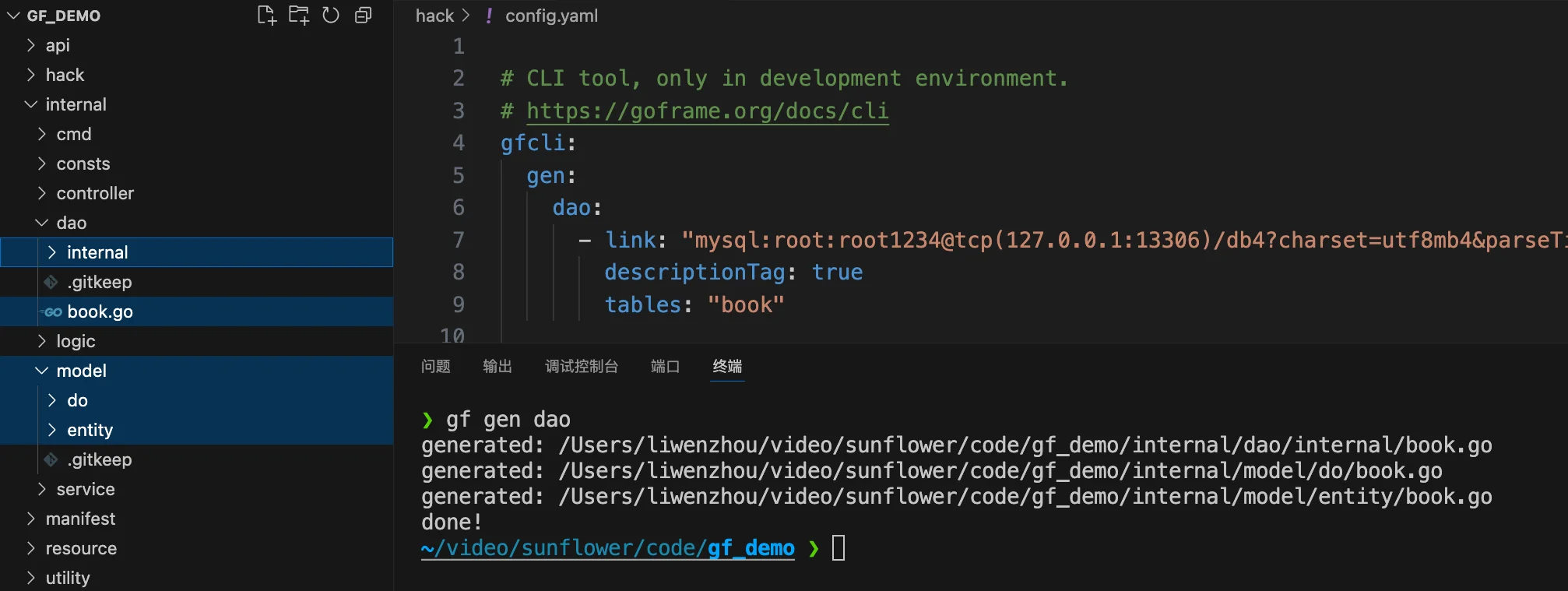
每张表将会生成三类 go文件:
dao:通过对象方式访问底层数据源,底层基于ORM组件实现。do:数据转换模型,用于业务模型到数据模型的转换,由工具维护,用户不能修改。工具每次生成代码文件将会覆盖该目录。entity:数据模型,由工具维护,用户不能修改。工具每次生成代码文件将会覆盖该目录。
3、编写 API 定义
在 api目录下新建 book 目录用来保存相关 API 定义。
考虑到后续接口的迭代,通常创建类似 v1 的版本号目录。
新增 api/book/v1/book.go 文件,添加以下增删改查 API 相关的请求和响应结构体定义。
package v1

import (
	"gf_demo/internal/model/entity"

	"github.com/gogf/gf/v2/frame/g"
)

// CreateReq 创建书籍请求结构体
type CreateReq struct {
	g.Meta `path:"/books" method:"post" tags:"Book" summary:"创建书籍"`
	Title  string `v:"required|length:1,45" dc:"书名"`
	Price  int    `v:"required|gt:0" dc:"价格"`
}

// CreateRes 创建书籍响应结构体
type CreateRes struct {
	Id int64 `json:"id" dc:"book id"`
}

// DeleteReq 删除书籍请求结构体
type DeleteReq struct {
	g.Meta `path:"/books/{id}" method:"delete" tags:"Book" summary:"Delete book"`
	ID     int64 `v:"required" dc:"book id"`
}

// DeleteRes 删除书籍响应结构体
type DeleteRes struct{}

// UpdateReq 更新书籍请求结构体
type UpdateReq struct {
	g.Meta `path:"/books/{id}" method:"put" tags:"Book" summary:"Update book"`
	ID     int64   `v:"required" dc:"book id"`
	Title  *string `v:"length:1,45" dc:"book title"`
	Price  *int    `v:"gt:0" dc:"book price"`
}

// UpdateRes 更新书籍响应结构体
type UpdateRes struct{}

// GetOneReq 获取单个用户请求结构体
type GetOneReq struct {
	g.Meta `path:"/books/{id}" method:"get" tags:"Book" summary:"Get one book"`
	Id     int64 `v:"required" dc:"book id"`
}
type GetOneRes struct {
	*entity.Book `dc:"book info"` // Book entity
}

// GetListReq 获取书籍列表请求结构体
type GetListReq struct {
	g.Meta `path:"/books" method:"get" tags:"Book" summary:"Get book list"`
}
type GetListRes struct {
	List []*entity.Book `json:"list" dc:"book list"`
}
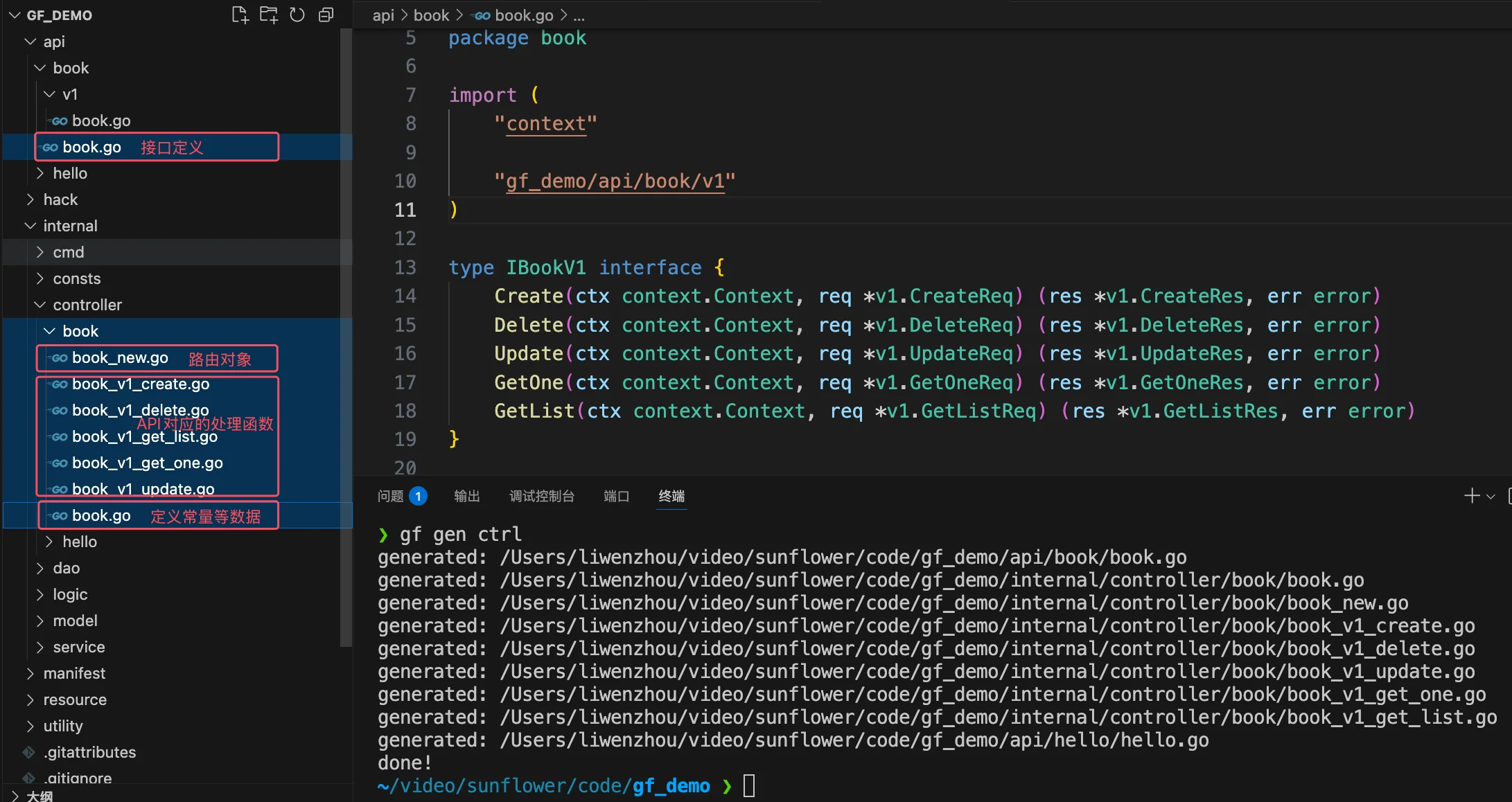
4、生成 controller 层代码
执行下面的命令,根据上一步定义的API,生成 controller 层代码。
gf gen ctrl生成代码如下:
5、编写接口的业务逻辑
通常,我们在controller层实现API参数解析和校验的逻辑,将业务逻辑写在logic层或service层。
但是像本示例中比较简单的逻辑,可直接在 controller层实现。
package book

import (
	"context"

	v1 "gf_demo/api/book/v1"
	"gf_demo/internal/dao"
	"gf_demo/internal/model/do"
)

func (c *ControllerV1) Create(ctx context.Context, req *v1.CreateReq) (res *v1.CreateRes, err error) {
	insertId, err := dao.Book.Ctx(ctx).Data(do.Book{
		Title:  req.Title,
		Price:  req.Price,
		Status: v1.StatusOK,
	}).InsertAndGetId()
	if err != nil {
		return nil, err
	}
	res = &v1.CreateRes{
		ID: insertId,
	}
	return
}
删除
func (c *ControllerV1) Delete(ctx context.Context, req *v1.DeleteReq) (*v1.DeleteRes, error) {
	_, err := dao.Book.Ctx(ctx).WherePri(req.ID).Delete()
	return nil, err
}
更新
func (c *ControllerV1) Update(ctx context.Context, req *v1.UpdateReq) (*v1.UpdateRes, error) {
	_, err := dao.Book.Ctx(ctx).Data(do.Book{
		Title:  req.Title,
		Price:  req.Price,
		Status: req.Status,
	}).WherePri(req.ID).Update()
	return nil, err
}
查单个
func (c *ControllerV1) GetOne(ctx context.Context, req *v1.GetOneReq) (*v1.GetOneRes, error) {
	var res v1.GetOneRes
	err := dao.Book.Ctx(ctx).WherePri(req.ID).Scan(&res.Book)
	return &res, err
}
查列表
func (c *ControllerV1) GetList(ctx context.Context, req *v1.GetListReq) (*v1.GetListRes, error) {
	// var res v1.GetListRes
	var res = v1.GetListRes{List: make([]*entity.Book, 0)} // 没有数据时返回 [],而不是 null
	err := dao.Book.Ctx(ctx).Where(do.Book{
		Status: req.Status,
	}).Scan(&res.List)
	return &res, err
}
6、完善配置和路由
6.1 添加数据库驱动
6.1.1、在 main.go 文件 import 导入 MySQL 驱动
package main

import (
	// _ "gf_demo/internal/packed"  // internal下没有这个包就删掉

	_ "github.com/gogf/gf/contrib/drivers/mysql/v2" // 导入MySQL驱动

	"github.com/gogf/gf/v2/os/gctx"

	"gf_demo/internal/cmd"
)

func main() {
	cmd.Main.Run(gctx.GetInitCtx())
}
6.1.2、在项目根目录下执行下面的命令
go mod tidy安装依赖。
6.2 添加业务配置 manifest/config/config.yaml
# https://goframe.org/docs/web/server-config-file-template
server:
  address:     ":8000"
  openapiPath: "/api.json"
  swaggerPath: "/swagger"

# https://goframe.org/docs/core/glog-config
logger:
  level : "all"
  stdout: true

# https://goframe.org/docs/core/gdb-config-file
database:
  default:
    link: "mysql:root:12345678@tcp(127.0.0.1:3306)/db4?charset=utf8mb4&parseTime=True&loc=Local"
6.3 internal/cmd/cmd.go添加路由
package cmd

import (
	"context"

	"github.com/gogf/gf/v2/frame/g"
	"github.com/gogf/gf/v2/net/ghttp"
	"github.com/gogf/gf/v2/os/gcmd"

	"gf_demo/internal/controller/book"
	"gf_demo/internal/controller/hello"
)

var (
	Main = gcmd.Command{
		Name:  "main",
		Usage: "main",
		Brief: "start http server",
		Func: func(ctx context.Context, parser *gcmd.Parser) (err error) {
			s := g.Server()
			s.Group("/", func(group *ghttp.RouterGroup) {
				group.Middleware(ghttp.MiddlewareHandlerResponse)
				group.Bind(
					hello.NewV1(),
					book.NewV1(), // 注册书籍相关的路由
				)
			})
			s.Run()
			return nil
		},
	}
)
7、启动服务
在项目根目录下执行 go run . 启动程序。
❯ go run .
2025-06-06T23:06:52.175+08:00 [INFO] pid[36959]: http server started listening on [:8000]
2025-06-06T23:06:52.175+08:00 [INFO] swagger ui is serving at address: http://127.0.0.1:8000/swagger/
2025-06-06T23:06:52.175+08:00 [INFO] openapi specification is serving at address: http://127.0.0.1:8000/api.json

  ADDRESS | METHOD |    ROUTE    |                         HANDLER                          |           MIDDLEWARE
----------|--------|-------------|----------------------------------------------------------|----------------------------------
  :8000   | ALL    | /api.json   | github.com/gogf/gf/v2/net/ghttp.(*Server).openapiSpec    |
----------|--------|-------------|----------------------------------------------------------|----------------------------------
  :8000   | GET    | /books      | gf_demo/internal/controller/book.(*ControllerV1).GetList | ghttp.MiddlewareHandlerResponse
----------|--------|-------------|----------------------------------------------------------|----------------------------------
  :8000   | POST   | /books      | gf_demo/internal/controller/book.(*ControllerV1).Create  | ghttp.MiddlewareHandlerResponse
----------|--------|-------------|----------------------------------------------------------|----------------------------------
  :8000   | DELETE | /books/{id} | gf_demo/internal/controller/book.(*ControllerV1).Delete  | ghttp.MiddlewareHandlerResponse
----------|--------|-------------|----------------------------------------------------------|----------------------------------
  :8000   | GET    | /books/{id} | gf_demo/internal/controller/book.(*ControllerV1).GetOne  | ghttp.MiddlewareHandlerResponse
----------|--------|-------------|----------------------------------------------------------|----------------------------------
  :8000   | PUT    | /books/{id} | gf_demo/internal/controller/book.(*ControllerV1).Update  | ghttp.MiddlewareHandlerResponse
----------|--------|-------------|----------------------------------------------------------|----------------------------------
  :8000   | GET    | /hello      | gf_demo/internal/controller/hello.(*ControllerV1).Hello  | ghttp.MiddlewareHandlerResponse
----------|--------|-------------|----------------------------------------------------------|----------------------------------
  :8000   | ALL    | /swagger/*  | github.com/gogf/gf/v2/net/ghttp.(*Server).swaggerUI      | HOOK_BEFORE_SERVE
----------|--------|-------------|----------------------------------------------------------|----------------------------------
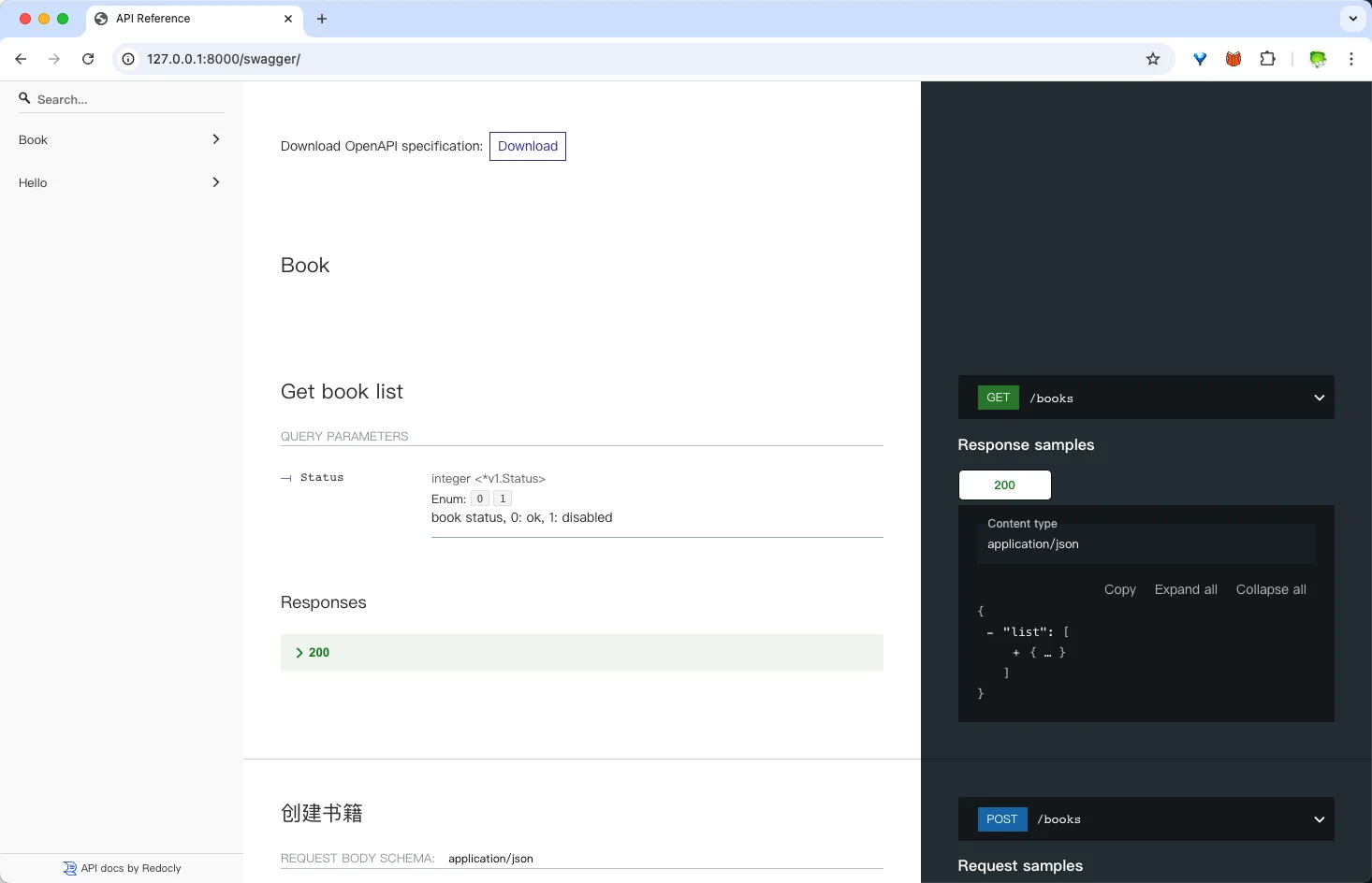
打开 http://127.0.0.1:8000/swagger/ 即可查看完整 API 文档。
其他常用功能介绍
路由注册
只需记两种,其他了解皆即可。
s.Group("/", func(group *ghttp.RouterGroup) {
	group.Middleware(ghttp.MiddlewareHandlerResponse) // 分组注册中间件
	group.Bind(
		hello.NewV1(),
		// 注册book相关路由
		// 请求方法和路径是根据 请求结构体里的 g.Meta 标签自动生成的
		book.NewV1(),
	)
})

s.Use(MiddlewareAuth)
s.BindHandler("GET:/index", func(r *ghttp.Request) {
	r.Response.WriteJsonExit(map[string]string{
		"name": "index",
	})
})

s.BindHandler("GET:/login", func(r *ghttp.Request) {
	r.Response.WriteJsonExit(map[string]string{
		"name":  "q1mi",
		"value": "gf_demo",
	})
})
中间件
原理洋葱模型。
处理前
业务处理handler
业务处理后
几个常用的中间件要记住。
获取请求参数
在 api 目录下定义请求参数结构体内嵌 g.Meta。
返回响应
使用通用格式响应中间件。
group.Middleware(ghttp.MiddlewareHandlerResponse)配置
官方文档:https://goframe.org/docs/core/gcfg
基本用法:
g.Cfg().Get(ctx, "viewpath")
g.Cfg().Get(ctx, "database.default.0.role")  // 支持层级访问
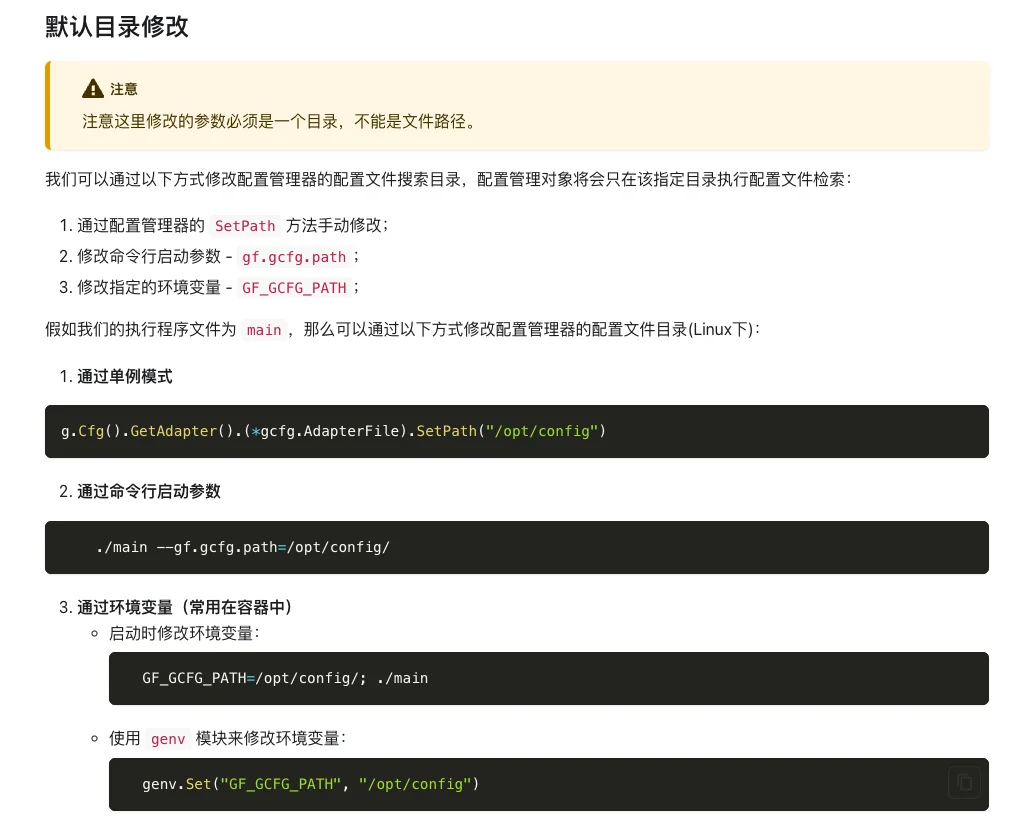
默认配置文件目录:会自动扫描工作目录下的 config 和manifest/config
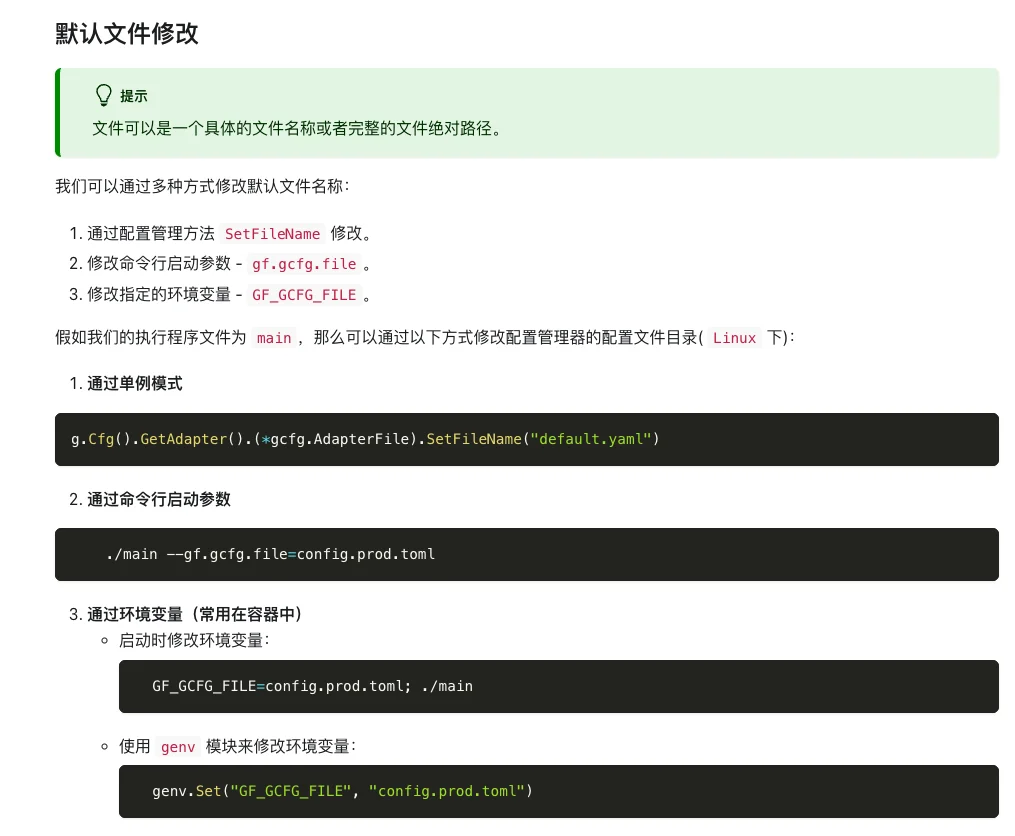
修改配置文件目录:
修改默认配置文件:
日志
官方文档:https://goframe.org/docs/core/glog
日志配置:
logger:
  path:                  "/var/log/"           # 日志文件路径。默认为空,表示关闭,仅输出到终端
  file:                  "{Y-m-d}.log"         # 日志文件格式。默认为"{Y-m-d}.log"
  prefix:                ""                    # 日志内容输出前缀。默认为空
  level:                 "all"                 # 日志输出级别
  timeFormat:            "2006-01-02T15:04:05" # 自定义日志输出的时间格式,使用Golang标准的时间格式配置
  ctxKeys:               []                    # 自定义Context上下文变量名称,自动打印Context的变量到日志中。默认为空
  header:                true                  # 是否打印日志的头信息。默认true
  stdout:                true                  # 日志是否同时输出到终端。默认true
  rotateSize:            0                     # 按照日志文件大小对文件进行滚动切分。默认为0,表示关闭滚动切分特性
  rotateExpire:          0                     # 按照日志文件时间间隔对文件滚动切分。默认为0,表示关闭滚动切分特性
  rotateBackupLimit:     0                     # 按照切分的文件数量清理切分文件,当滚动切分特性开启时有效。默认为0,表示不备份,切分则删除
  rotateBackupExpire:    0                     # 按照切分的文件有效期清理切分文件,当滚动切分特性开启时有效。默认为0,表示不备份,切分则删除
  rotateBackupCompress:  0                     # 滚动切分文件的压缩比(0-9)。默认为0,表示不压缩
  rotateCheckInterval:   "1h"                  # 滚动切分的时间检测间隔,一般不需要设置。默认为1小时
  stdoutColorDisabled:   false                 # 关闭终端的颜色打印。默认开启
  writerColorEnable:     false                 # 日志文件是否带上颜色。默认false,表示不带颜色
基本用法:
g.Log().Debug(ctx, gtime.Datetime())
g.Log().Info(ctx, gtime.Datetime())
输出 JSON 格式
g.Log().Debug(ctx, g.Map{"uid": 100, "name": "john"})错误处理
官方文档:https://goframe.org/docs/core/gerror
err = errors.New("sql error")
err = gerror.Wrap(err, "adding failed")
err = gerror.Wrap(err, "api calling failed")
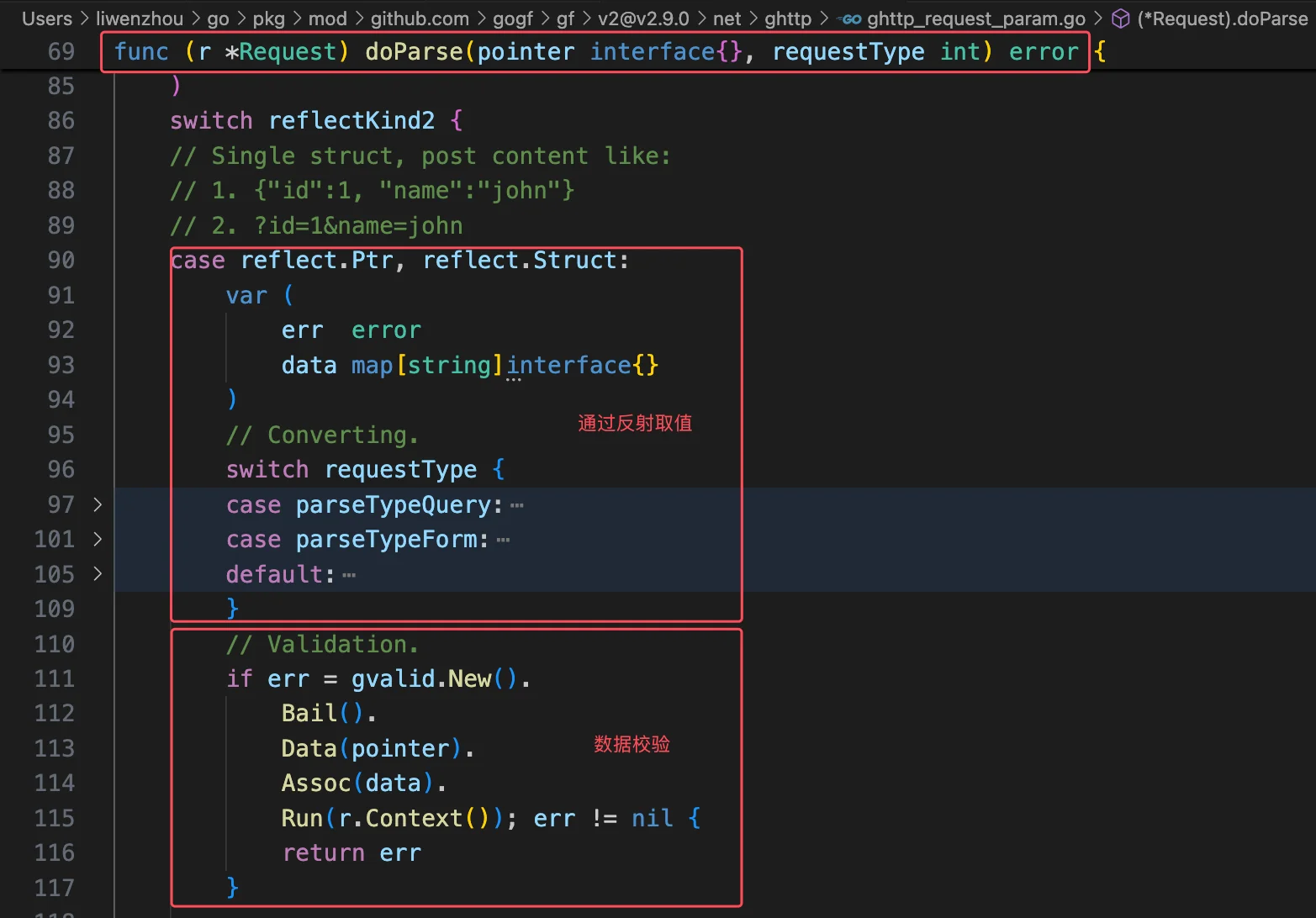
数据校验
官方文档:https://goframe.org/docs/core/gvalid
- 内置数据校验规则
- 常用数据校验方法
- 如何自定义校验规则
- I18n 特性
补充:框架自动从请求参数解析数据并对req对象赋值。
数据库 ORM
官方文档:https://goframe.org/docs/core/gdb
通用方法:
lastInsertId, err := g.DB().Model("book").Ctx(ctx).Data(g.Map{
	"title":  req.Title,
	"price":  req.Price,
	"status": v1.StatusAvailable,
}).InsertAndGetId()
最佳实践:
lastInsertId, err := dao.Book.Ctx(ctx).Data(do.Book{
  Title:  req.Title,
  Price:  req.Price,
  Status: v1.StatusAvailable,
}).InsertAndGetId()
缓存
注意! 一定要记得注册 Redis 驱动!!!
import _ "github.com/gogf/gf/contrib/nosql/redis/v2"基于内存的缓存
// 内存缓存
cache := gcache.New()
cache.Set(ctx, "key1", "value1", time.Minute*10)
// 返回的是 gvar.Var 类型
if v, err := cache.Get(ctx, "key1"); err != nil {
	return nil, err
} else {
	fmt.Println(v.String())
}
// 使用gcache包提供的全局cache对象
// gcache.Set(ctx, "key2", "value2", time.Minute*10)
基于 Redis 的缓存
// 基于redis的缓存
redisCache := gcache.New()
// 拿到redis client: gredis.Redis
redisCache.SetAdapter(gcache.NewAdapterRedis(g.Redis())) // 设置Redis适配器
redisCache.Set(ctx, "key2", "value2", time.Minute*10)
// 返回的是 gvar.Var 类型
if v, err := redisCache.Get(ctx, "key2"); err != nil {
	return nil, err
} else {
	fmt.Println(v.String())
}
给 ORM 设置基于 Redis 的缓存
g.DB().GetCache().SetAdapter(gcache.NewAdapterRedis(g.Redis()))g.Redis() 是 goframe 框架给我们自动初始化好的全局 Redis Client 对象。
对应的配置文件 manifest/config/config.yaml 中的:
# Redis 配置示例
redis:
  # 单实例配置示例1
  default:
    address: 127.0.0.1:6379
    db:      0
连接Redis
使用 github.com/redis/go-redis/v9 包自行连接 Redis。
// Copyright GoFrame Author(https://goframe.org). All Rights Reserved.
//
// This Source Code Form is subject to the terms of the MIT License.
// If a copy of the MIT was not distributed with this file,
// You can obtain one at https://github.com/gogf/gf.

package main

import (
	"github.com/gogf/gf/v2/errors/gerror"
	"github.com/gogf/gf/v2/frame/g"
	"github.com/gogf/gf/v2/os/gctx"
	"github.com/redis/go-redis/v9"
)

// main demonstrates basic Redis operations using GoFrame
// It initializes a Redis client and performs simple SET/GET operations
func main() {
	// Get the initialization context
	ctx := gctx.GetInitCtx()

	// Initialize Redis client with error handling
	redisClient, err := NewRedisClient()
	if err != nil {
		panic(err)
	}

	// Demonstrate basic Redis operations
	redisClient.Set(ctx, "key", "value", 0)
	redisClient.Get(ctx, "key")
	g.Log().Info(ctx, `key:`, redisClient.Get(ctx, "key").Val())
}

// RedisConfig defines the configuration structure for Redis connection
type RedisConfig struct {
	Address  string // Redis server address in format "host:port"
	Password string // Redis server password, empty if no password is set
}

// NewRedisClient creates and initializes a new Redis client using configuration from config.yaml
// Returns the initialized client and any error encountered during initialization
func NewRedisClient() (*redis.Client, error) {
	var (
		err    error
		ctx    = gctx.GetInitCtx()
		config *RedisConfig
	)

	// Load Redis configuration from config.yaml
	err = g.Cfg().MustGet(ctx, "redis").Scan(&config)
	if err != nil {
		return nil, err
	}
	if config == nil {
		return nil, gerror.New("redis config not found")
	}
	g.Log().Debugf(ctx, "Redis Config: %s", config)

	// Initialize Redis client with the loaded configuration
	redisClient := redis.NewClient(&redis.Options{
		Addr:     config.Address,
		Password: config.Password,
	})

	// Test the connection by sending a PING command
	err = redisClient.Ping(ctx).Err()
	return redisClient, err
}
设置缓存:
  // Create redis client object.
  redis, err := gredis.New(redisConfig)
  if err != nil {
      panic(err)
  }
  // Create redis cache adapter and set it to cache object.
  cache.SetAdapter(gcache.NewAdapterRedis(redis))
依赖注入
使用github.com/samber/do包进行依赖管理
utility/injection/redis.go 声明注入 Redis Client的函数。
package injection

import (
	"context"

	"github.com/gogf/gf/v2/errors/gerror"
	"github.com/gogf/gf/v2/frame/g"
	"github.com/redis/go-redis/v9"
	"github.com/samber/do"
)

// injectRedis 注入 Redis.
func injectRedis(ctx context.Context, injector *do.Injector) {
	do.Provide(injector, func(i *do.Injector) (*redis.Client, error) {
		type RedisConfig struct {
			Address  string
			Password string
		}
		var (
			err    error
			config *RedisConfig
		)
		err = g.Cfg().MustGet(ctx, "redis").Scan(&config)
		if err != nil {
			return nil, err
		}
		if config == nil {
			return nil, gerror.New("redis config not found")
		}
		g.Log().Debugf(ctx, "Redis Config: %s", config)
		svc := redis.NewClient(&redis.Options{
			Addr:     config.Address,
			Password: config.Password,
		})
		SetupShutdownHelper(injector, svc, func(svc *redis.Client) error {
			return svc.Close()
		})
		return svc, nil
	})
}
utility/injection/injection.go 定义依赖注入器,并注入 Redis Client。
package injection

import (
	"context"
	"fmt"
	"reflect"

	"github.com/gogf/gf/v2/frame/g"
	"github.com/samber/do"
)

var defaultInjector *do.Injector

// MustInvoke invokes the function with the default injector and panics if any error occurs.
func MustInvoke[T any]() T {
	return do.MustInvoke[T](defaultInjector)
}

// Invoke invokes the function with the default injector.
func Invoke[T any]() (T, error) {
	return do.Invoke[T](defaultInjector)
}

// SetupDefaultInjector initializes the default injector with the given context.
func SetupDefaultInjector(ctx context.Context) *do.Injector {
	if defaultInjector != nil {
		return defaultInjector
	}
	injector := do.NewWithOpts(&do.InjectorOpts{})

	injectRedis(ctx, injector)

	defaultInjector = injector
	return defaultInjector
}

// ShutdownDefaultInjector shuts down the default injector.
func ShutdownDefaultInjector() {
	if defaultInjector != nil {
		if err := defaultInjector.Shutdown(); err != nil {
			g.Log().Debugf(context.Background(), "ShutdownDefaultInjector: %+v", err)
		}
		defaultInjector = nil
	}
}

// SetupShutdownHelper sets up a shutdown helper.
func SetupShutdownHelper[T any](injector *do.Injector, service T, onShutdown func(service T) error) {
	do.Provide(injector, func(i *do.Injector) (ShutdownHelper[T], error) {
		g.Log().Debugf(context.Background(), "NewShutdownHelper: %s", reflect.TypeOf(service))
		return NewShutdownHelper(service, onShutdown), nil
	})
	do.MustInvoke[ShutdownHelper[T]](injector)
}

// SetupShutdownHelperNamed sets up a shutdown helper with a name.
func SetupShutdownHelperNamed[T any](injector *do.Injector, service T, name string, onShutdown func(service T) error) {
	name = fmt.Sprintf("ShutdownHelper:%s", name)
	do.ProvideNamed(injector, name, func(i *do.Injector) (ShutdownHelper[T], error) {
		g.Log().Debugf(
			context.Background(),
			"NewShutdownHelper: %s, %s",
			reflect.TypeOf(service), name,
		)
		return NewShutdownHelperNamed(service, name, onShutdown), nil
	})
	do.MustInvokeNamed[ShutdownHelper[T]](injector, name)
}

// ShutdownHelper is a helper struct for shutdown.
type ShutdownHelper[T any] struct {
	name       string
	service    T
	onShutdown func(service T) error
}

// NewShutdownHelper creates a new ShutdownHelper.
func NewShutdownHelper[T any](service T, onShutdown func(service T) error) ShutdownHelper[T] {
	return ShutdownHelper[T]{
		service:    service,
		onShutdown: onShutdown,
	}
}

// NewShutdownHelperNamed creates a new ShutdownHelper with a name.
func NewShutdownHelperNamed[T any](service T, name string, onShutdown func(service T) error) ShutdownHelper[T] {
	return ShutdownHelper[T]{
		name:       name,
		service:    service,
		onShutdown: onShutdown,
	}
}

// Shutdown shuts down the service.
func (h ShutdownHelper[T]) Shutdown() error {
	g.Log().Debugf(
		context.Background(),
		"ShutdownHelper Shutdown: %s, %s",
		reflect.TypeOf(h.service), h.name,
	)
	return h.onShutdown(h.service)
}
在 internal/cmd/cmd.go 的程序入口处添加依赖注入。
injection.SetupDefaultInjector(ctx)
defer injection.ShutdownDefaultInjector()
在需要使用的地方
func New() *Service {
	return &Service{
		rc:        injection.MustInvoke[*redis.Client](),  // 取出 redis client
	}
}